A website designer for a small business should solve a specific commercial problem, not simply deliver a more attractive homepage. A plumbing company may need visitors to find the right service and request help in seconds. A financial advisory firm has to make its expertise and working process understandable. An online software company needs to explain the product, show what it does and move prospective buyers toward a trial or conversation.
All three businesses can have polished websites. Yet the page architecture, calls to action, content and technical requirements should be very different. The first question to ask a designer is therefore not “Can you make it look premium?” It is “How will the website help the right customer make the next decision?”
This guide explains how to assess a website designer, what to prepare before requesting a quote, which deliverables to specify, what to check in a live portfolio and when an existing design is a smarter starting point than a fully bespoke build.
Start with the outcome, not the design style
Before contacting a freelancer or studio, write down what the finished site needs to accomplish. If the goal is unclear, a visually compelling proposal can hide an inadequate scope.
For a small business, a website usually has one dominant job: generate enquiries, secure appointments, sell products, explain a specialist service or support trust before a referral converts. Secondary objectives matter, but the primary one should drive the homepage and navigation.
Consider three short briefs:
- Local service company: Show service areas, explain urgent and routine services, make click-to-call obvious and reduce form friction.
- Professional services firm: Establish positioning, credentials and process; let prospects identify the right service and request a meeting.
- Software business: Explain the product, demonstrate workflows, present pricing or contact routes and reduce uncertainty before signup.
Those goals make it easier to evaluate a portfolio and compare proposals. Without them, discussions often drift toward animations, colours and whichever homepage reference was sent last.
1. Review live websites, not just screenshots
A designer's portfolio is important, but a screenshot proves mainly that a visual composition exists. It does not prove that the website works well as an experience.
Open the live examples. Check the mobile menu, read the service pages, follow the primary call to action, look at how forms are presented and see whether the site stays coherent beyond the first screen. Ask which parts of each example the provider actually designed and built. A concept website, licensed template, redesign and live client commission can all demonstrate skill, but they are different kinds of evidence.
You can also look for evidence that the design is appropriate to its industry. Does a trades website direct visitors toward the work they need? Does a professional firm's navigation support credibility? Does an ecommerce store make products, delivery and checkout easy to understand?
What to ask: “Can I open a complete example on my phone, and can you explain why its navigation and page structure were chosen?”
2. Confirm what “website design” actually includes
The word design is used for several different products. A graphic mockup, a coded template, a customised theme and a finished, connected, tested website are not interchangeable.
Before comparing prices, ask whether the proposed engagement includes:
- discovery, page planning and content structure;
- visual design and mobile-responsive layouts;
- development and platform configuration;
- copywriting, image sourcing or content migration;
- forms, booking, product setup or other integrations;
- technical SEO basics and analytics setup;
- domain connection, deployment and launch testing; and
- training, revisions and post-launch support.
A lower quote may cover only a design handoff; a higher one may include production build and launch. Compare the actual deliverables, not the headline amount. For a deeper breakdown of scope and continuing expenses, read our website design cost guide.
3. Evaluate the information architecture before visual polish
A useful homepage often starts with an unmistakable value proposition, a primary next action and links to the important pages. It does not need to explain every detail. Good navigation is a routing system.
Ask the designer to outline the proposed page types. A five-page service site might need Home, Services, About, Work or Proof, and Contact. A more complex practice could require separate pages for high-value services, staff, locations and useful resources. An ecommerce business will need a different model: collections, product pages, cart and checkout, plus clear shipping and returns information.
Count unique page types, not just URLs. Ten service pages sharing one well-planned structure may be more straightforward to create than three entirely different interactive experiences.
Where the provider offers a predefined template, check whether its structure genuinely matches your content. A template should remove unnecessary blank-canvas work, not force your business into a layout that hides important information.
4. Ask to see a real conversion path
A conversion path is the route between arriving on a page and completing a meaningful action. That may be booking a consultation, requesting a quote, calling a business, starting a free trial or purchasing a product.
The path should be visible in a live design. For a service site, follow the journey from the hero statement to the relevant service and then to the enquiry method. Notice whether the page answers obvious objections before it asks for personal details. On mobile, check whether the booking or call action remains accessible without obstructing content.
A strong designer should be able to explain why one action is primary. “Get in touch,” “Read more,” “Book now,” “Explore,” and “Learn about us” should not all compete equally on the same screen.
Three real Depiction Studio design concepts — three different buyer journeys
The following are Depiction Studio concept designs, not claimed client projects or evidence of measured conversion results. They illustrate how different businesses need different website architecture.
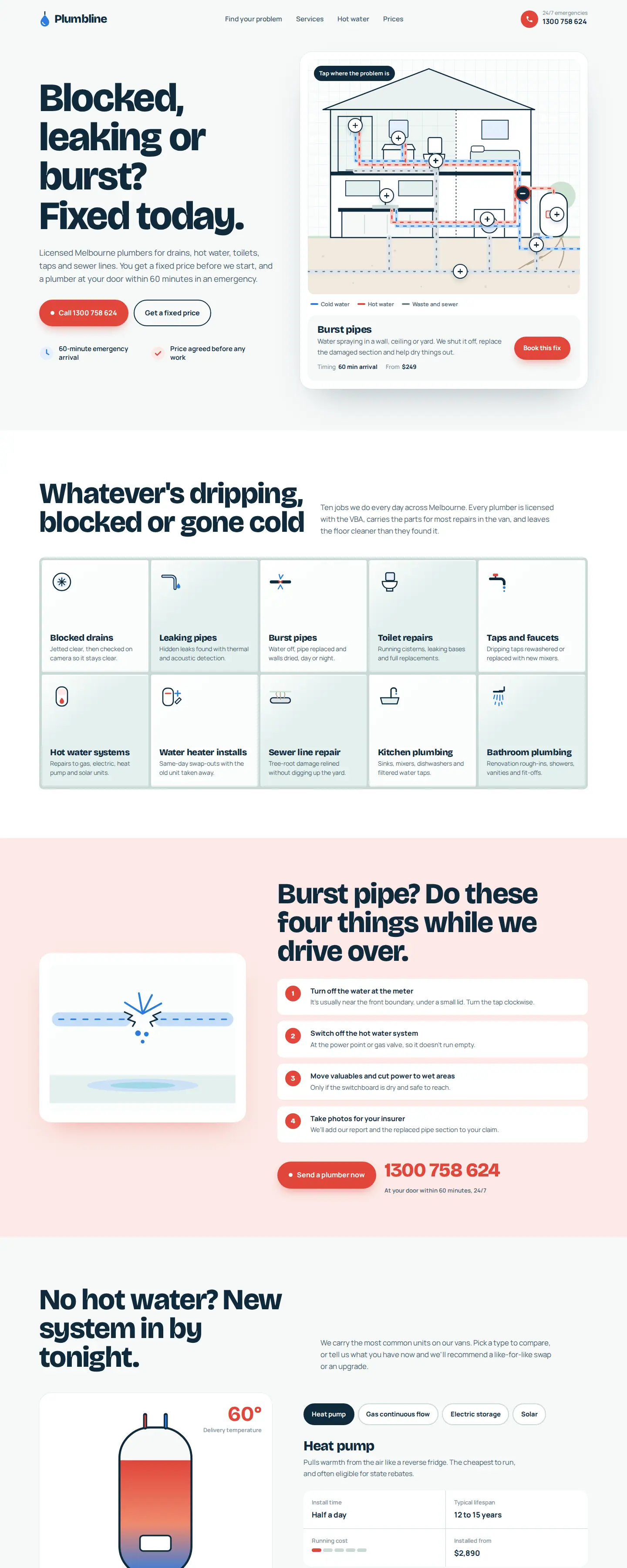
Plumbline: a local service website designed around a problem
Plumbline is a plumbing-service concept with an immediate problem-led headline and clear routes for blocked drains, leaks, burst pipes and hot-water work. Visitors can navigate by issue rather than having to interpret a generic list of company capabilities. It also presents a service process and a quote action.
The useful design decision here is prioritisation: a person with a burst pipe has different intent from someone comparing firms for a future renovation. The site makes those needs legible. You can view it alongside other trades website designs.
Heartwood Private Wealth: a relationship-led service website
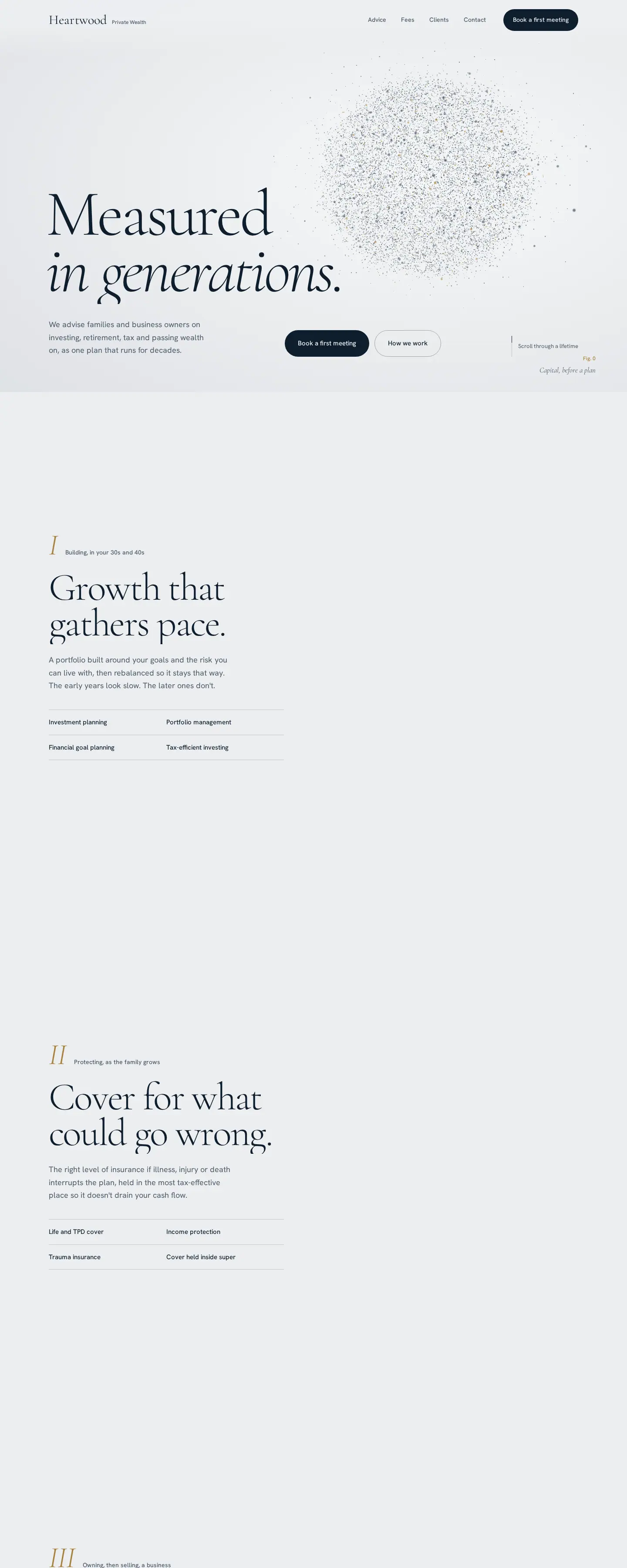
Heartwood Private Wealth uses a deliberately calmer structure. Its navigation gives prominence to Advice, Fees, Clients and Contact, while the content explains planning priorities and what happens during an initial engagement.
Unlike a plumbing page, this design is not primarily about an urgent fix. It is designed for a considered service decision, where positioning, fee clarity and trust-building matter. Explore related wealth-management website designs.
Noema: a software site that has to explain a product
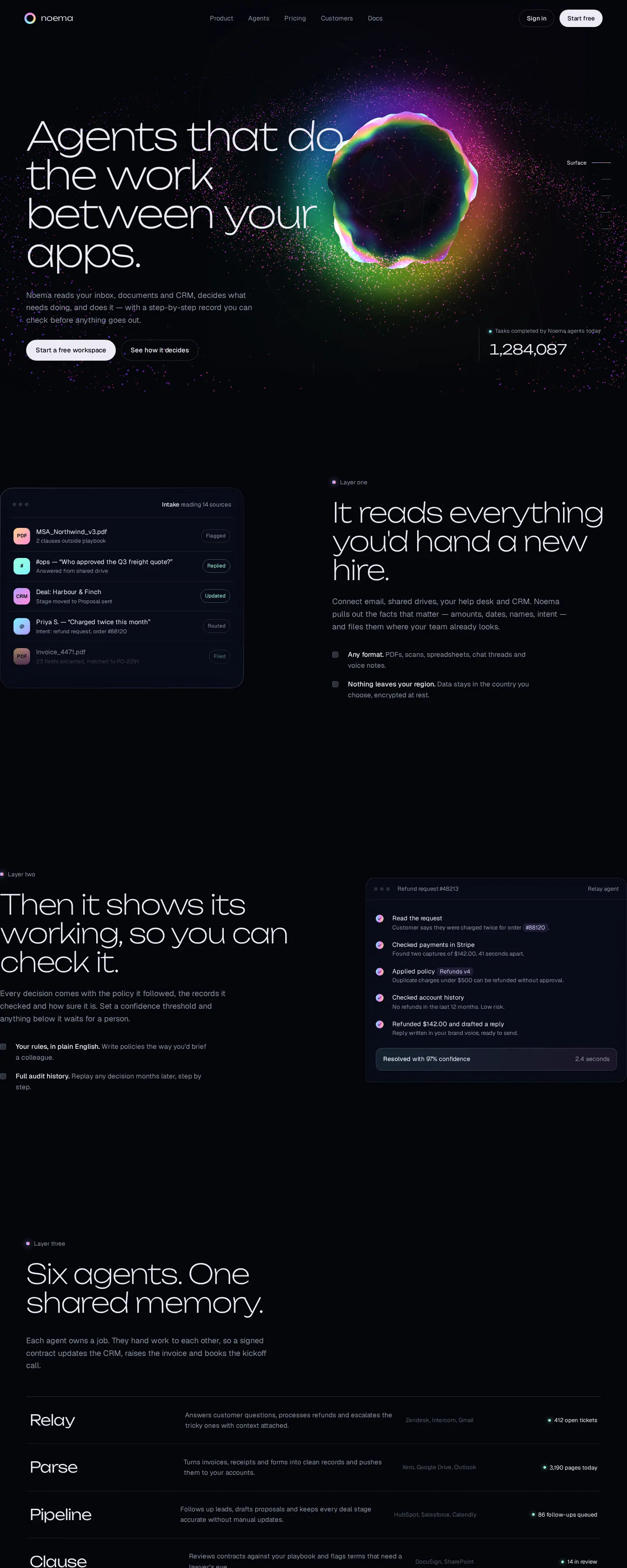
Noema is structured around the product's promise, how its agents work, individual product capabilities and pricing. A software buyer needs to understand more than the company name: what the product does, where it fits and how to take the next step.
That requires an explanation-led hierarchy rather than the service-led architecture of Plumbline or the relationship-led presentation of Heartwood. See the AI SaaS design collection for more examples.
These comparisons are worth making before hiring. The question is not whether a designer can produce a beautiful visual style. It is whether they can choose and explain a structure that matches your business.
5. Check mobile behaviour and accessibility early
Do not treat responsiveness as a line item to check at the end. It changes navigation, spacing, type scale, form fields, tap targets and image choices.
Ask to test the actual interface on a narrow phone viewport. Can you open and close the menu? Can you read the main content without zooming? Can you select a form field comfortably? Are buttons identifiable? Do any carousels, sticky bars or overlays hide useful information?
Accessibility should be part of that evaluation. The W3C's Web Content Accessibility Guidelines (WCAG) 2.2 provide a recognised framework for accessible websites. Practical questions include keyboard navigation, focus visibility, sufficient colour contrast, meaningful headings, readable labels and alternative text for informative images.
A provider need not promise a certification it cannot support. But they should be able to explain what accessibility checks are included, what standard is being targeted and how issues are handled.
6. Ask about performance and search fundamentals
A visually rich site can still be frustrating if it loads slowly or is difficult for search engines to understand. Ask whether the project covers image optimisation, sensible code loading, mobile usability, descriptive page titles, crawlable navigation, clean URLs and technical indexing basics.
Google's SEO Starter Guide explains that search optimisation is about helping both visitors and search engines understand content. It does not promise ranking positions. Be cautious of a designer who guarantees a number-one Google result merely because they are building a new website.
For redesigns, request a plan for existing URLs, redirects and content migration. A good-looking replacement site is not automatically a successful migration. It should preserve useful pages and incoming links wherever sensible.
7. Verify domain, hosting, source files and account ownership
Ownership is not a decorative contract clause. It determines whether the business can move providers, change its domain settings, retrieve content, access analytics and maintain the site after launch.
Before paying, clarify:
- Who is the registrant or account holder for the domain?
- Who controls DNS, hosting and deployment?
- Will the business have the necessary admin permissions?
- Is the design licensed for one business, or is source-code ownership included?
- Who owns copy, photography and any third-party assets?
- Are there separate costs for plugins, apps, themes, stock assets or software subscriptions?
- What happens if the business changes providers?
A licensed pre-designed website can be a perfectly reasonable purchase, but the scope of the licence and the handover conditions must be clear. Do not assume buying access to a design automatically transfers exclusive ownership of every underlying asset.
8. Compare proposals by scope, not a single headline price
For small businesses, the right supplier might be an independent designer, a focused studio, a larger agency or a platform specialist. Their overhead, strengths and delivery models differ. None is universally the right answer.
Compare offers on the same brief. A useful proposal should state the pages or unique templates, integrations, content responsibilities, revisions, milestones, launch criteria, acceptance process and support period. If one proposal is much cheaper, determine whether it excludes content, testing or deployment rather than treating the difference as pure savings.
If you are deciding between a pre-designed starting point and a fully custom build, the relevant question is whether your requirements genuinely need new interaction patterns or an unusual content model. For a conventional service or storefront website, a strong design can often provide a more efficient starting point. For specialist systems or complex integrations, a custom implementation may be warranted.
9. Know what happens after the website goes live
Launch is a checkpoint, not the end of the site's useful life. Someone needs to maintain contact information, services, pricing or products, platform updates and security-related dependencies. The business may also want to publish new content, review enquiries and measure which pages attract potential customers.
Ask who fixes defects discovered after launch, how long support lasts, whether support covers content changes or only technical faults, and what response expectations apply. For WordPress sites, clarify plugin and theme updates. For Shopify stores, clarify app subscriptions and product-management responsibilities. For custom-framework sites, clarify hosting, repository access and future developer handover.
These details are easiest to settle before the project begins.
10. Ten questions to ask a website designer before paying
- Who is the intended visitor? How does the proposed website help that person decide?
- What complete live sites can I test? Which parts did you design or build?
- What exactly is included? Design only, development, content, deployment or ongoing support?
- What are the unique page types? Which pages reuse a common layout?
- How is the main enquiry or purchase journey designed? Can you demonstrate it?
- What mobile and accessibility checks are performed? On which devices and against which criteria?
- What SEO and performance basics are included? What is outside the scope?
- Who owns or controls the domain, hosting, files and accounts? Can I move providers?
- How do revisions and changes work? How many are included, and what counts as additional scope?
- What is the launch and handover process? What will I receive, and who supports it afterwards?
A credible answer should name a deliverable, access permission, acceptance test or practical example. “We take care of everything” is not a useful scope statement by itself.
Freelancer, agency, template or design-led studio?
Choose based on complexity and the amount of ongoing help you want, not on whether one type of supplier sounds more prestigious.
Independent freelancer
Can be suitable when the scope is focused and communication with the person doing the work matters. Confirm availability, handover and coverage if that person becomes unavailable.
Full-service agency
Can make sense when strategy, design, copywriting, integrations, marketing and multiple stakeholders need coordination. Ask who performs each discipline and how the account will be managed.
Template or pre-designed website
Can save time when the layout and information architecture are already aligned with the business. Check platform compatibility, licence conditions, customisation depth and what is included in the purchase.
Design-led studio with optional build
Offers a way to inspect the visual direction first and then decide whether to use the design independently or commission a build. This is the Depiction Studio approach: browse the website designs, open the live demos, and choose between owning a design or having the studio customise and build it.
Warning signs when hiring a website designer
- A portfolio consists only of static mockups with no explanation of what is functional.
- The provider wants a commitment before discussing pages, content or the conversion path.
- “SEO included” has no explanation of technical deliverables.
- The mobile experience is treated as an automatic resizing exercise.
- Ownership of the domain, site and accounts is unclear.
- Third-party subscription costs are not identified.
- The promised launch date has no assumptions about client approvals and content delivery.
- The proposal contains unverified claims about rankings, conversions or client results.
One red flag does not necessarily mean the designer is unsuitable. It does mean that a material question is unresolved. Resolve it in the written scope before paying.
Frequently asked questions
How do I choose a website designer for a small business?
Start with the outcome the website must support. Review working sites on desktop and mobile, ask the provider to explain content structure and conversion paths, and get a written scope covering pages, content, integrations, launch, support and ownership.
Should I hire a website designer or use a template?
Use a suitable template or pre-designed website if its structure is a strong match and you can manage the necessary changes. Hire a designer or studio when you need help shaping the site around your specific services, brand, content, user journeys or technical requirements.
How much should a small-business website designer cost?
Costs vary with scope, platform, content and integrations; there is no universal price. Ask whether the quote includes implementation, revisions and launch rather than assuming every “website design” offer covers the same work. See the full website design cost comparison.
Do I need WordPress, Shopify or custom development?
Choose the platform based on what the business needs to manage. Shopify is built around ecommerce operations; WordPress is often appropriate for editable content-led websites; and custom implementations are more relevant when the user experience or technical requirements go beyond ordinary site patterns. A competent provider should explain the tradeoffs for your actual project.
What should I receive when the site launches?
At minimum, expect the agreed production website, relevant account access, a clear record of platform and subscription dependencies, any deliverables covered by the contract, and instructions for ordinary content updates and support requests. The precise handover depends on the design licence and development agreement.
See the website before you commission the build.
Explore Depiction Studio's live website designs across industries. Select a direction that suits your business, then own the design or have it customised and built for you.
Explore the design collection ↗